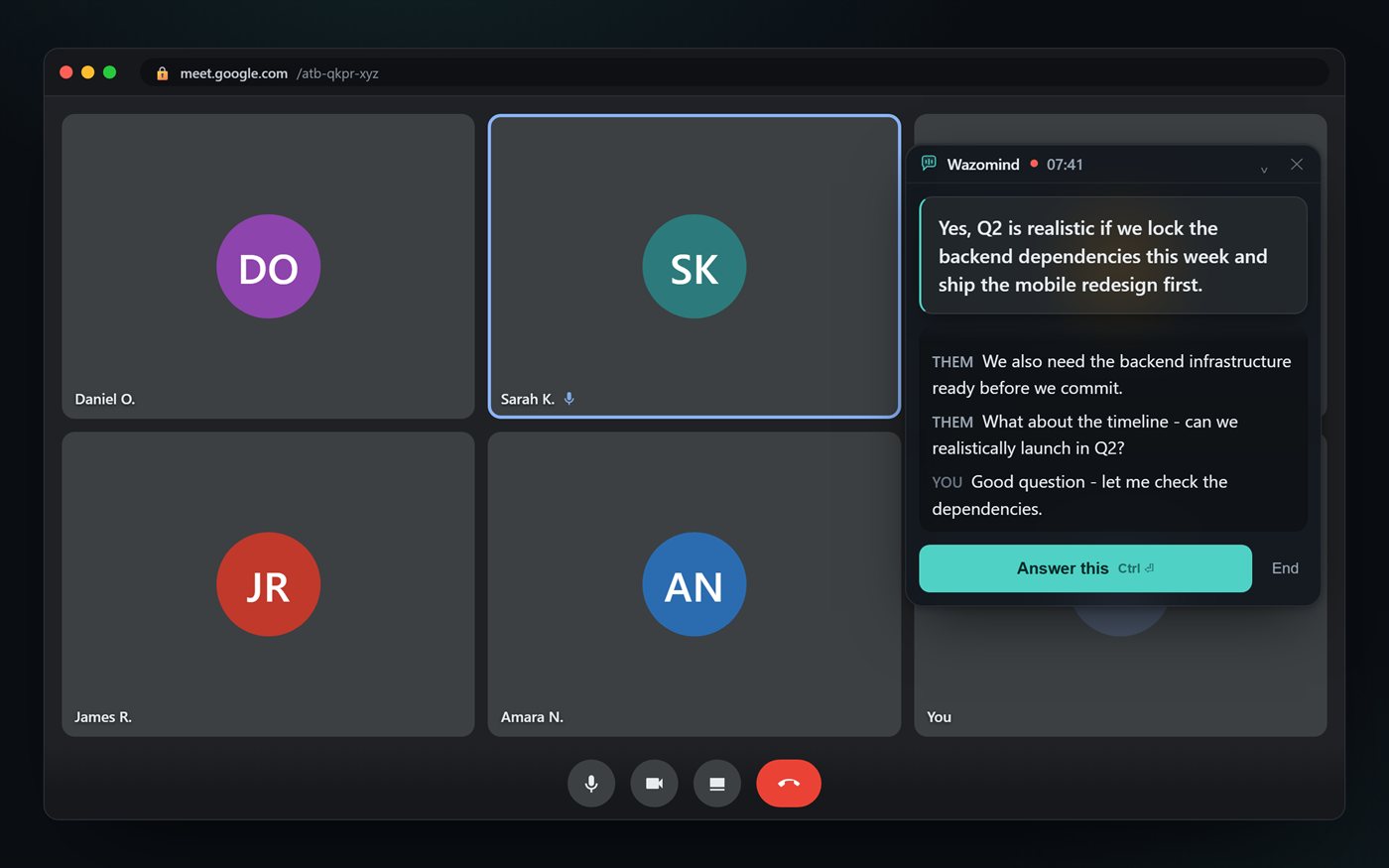
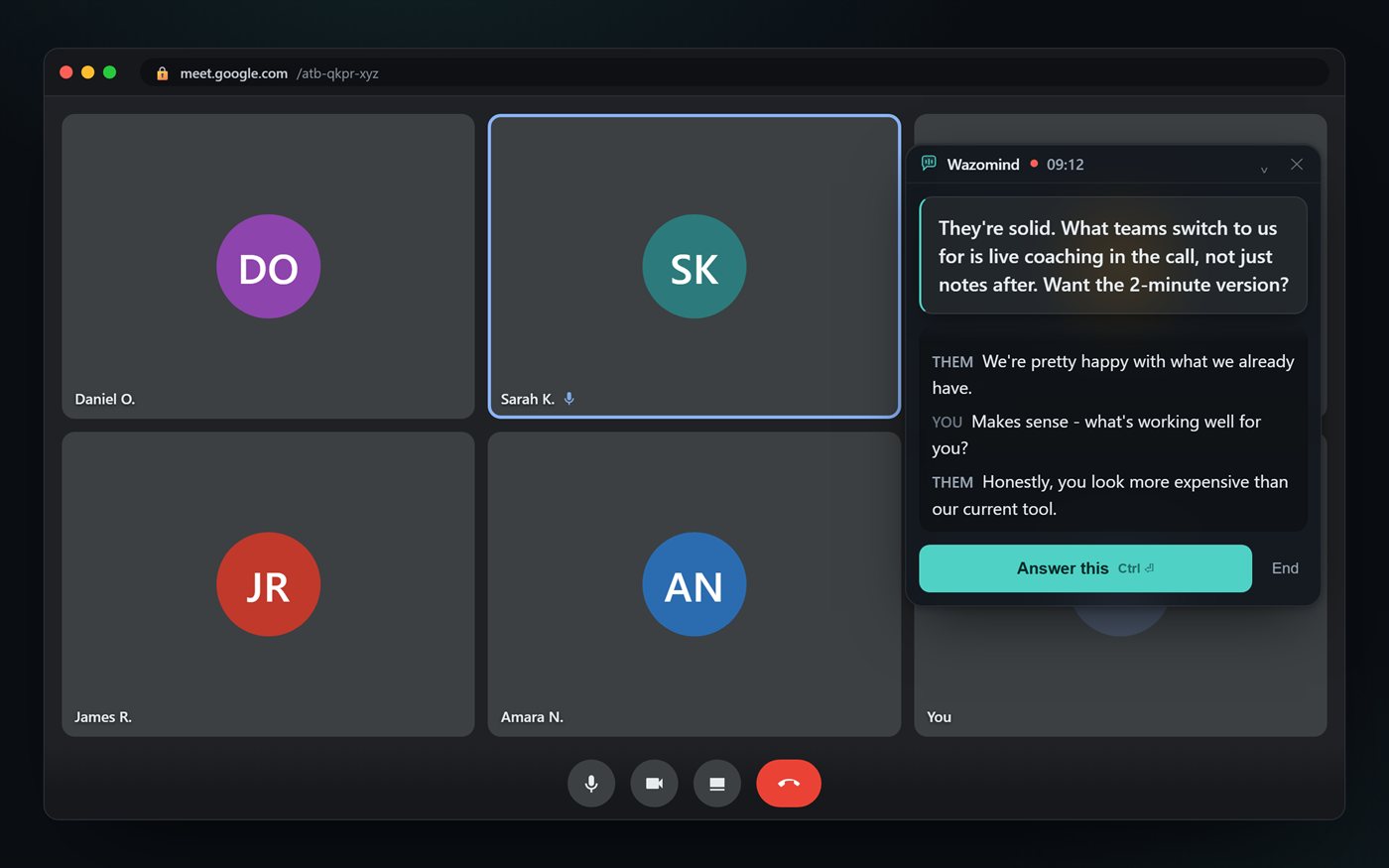
A prospect asks what it costs annually, or names a competitor, and you have three seconds. Wazomind is listening on your side of the call and puts the answer on your screen - before the pause gets awkward. No bot joins the meeting.
Meeting in person? Record it in your browser, nothing to install →
Works with Zoom · Meet · Teams · Webex · free, no card · See why "live" wins
Otter, Fireflies, Fathom and Granola are excellent - at telling you what happened after the meeting ends. That's a diary. In the moment a prospect asks for a number, a diary doesn't help. Wazomind works the other way around: it's a co-pilot that speaks up during the call, then hands you the notes too.
| What matters mid-call | Wazomind | Notetakers | Other live assistants |
|---|---|---|---|
| Answers live, during the call | Yes | After only | Yes |
| Under ~2s, usable mid-sentence | Yes | - | 5–10s lag |
| Grounded in your own documents | Yes | Rarely | Model guesses |
| Call audio never stored fully on-device on the Windows app | Yes | Cloud | Cloud + breach |
| Invisible on screen share stealth mode in the Windows app | Yes | Bot in the call | Some |
| Free tier you can actually use | 5 / mo | Varies | 5 prompts |
Watch the demo
Wazomind listens to your call and puts a suggested answer on screen while the other person is still talking, then writes your summary, action items and follow-up email. No bot joins.
Okay, if your job involves talking to people on calls… you need to know about this. You know that moment when someone asks you something on a call, and your brain just… leaves? Like, you know the answer. It just doesn't show up in time. So there's a tool called Wazomind that's built for exactly this. And it's not just another note-taker. It listens to the call, and while the other person is still talking, it puts a suggested answer right there on your screen. So by the time they stop… you already know what to say. And no bot joins your meeting, which… thank you. It runs in Chrome on Google Meet, Zoom and Teams, and there's a Windows app too. Then when you hang up, it's already written your summary, your action items and the follow-up email. Like… done. It's free to start, so honestly, just try it on your next call. Wazomind. W, A, Z, O… mind. Link's below.
Drop in a name and your notes; Wazomind briefs you on who they are, what they'll care about, and your best opening - pulled from your own material.
Windows appIt transcribes both sides, flags the question aimed at you, and lifts a tight answer onto a quiet overlay only you can see. One hotkey for "answer that."
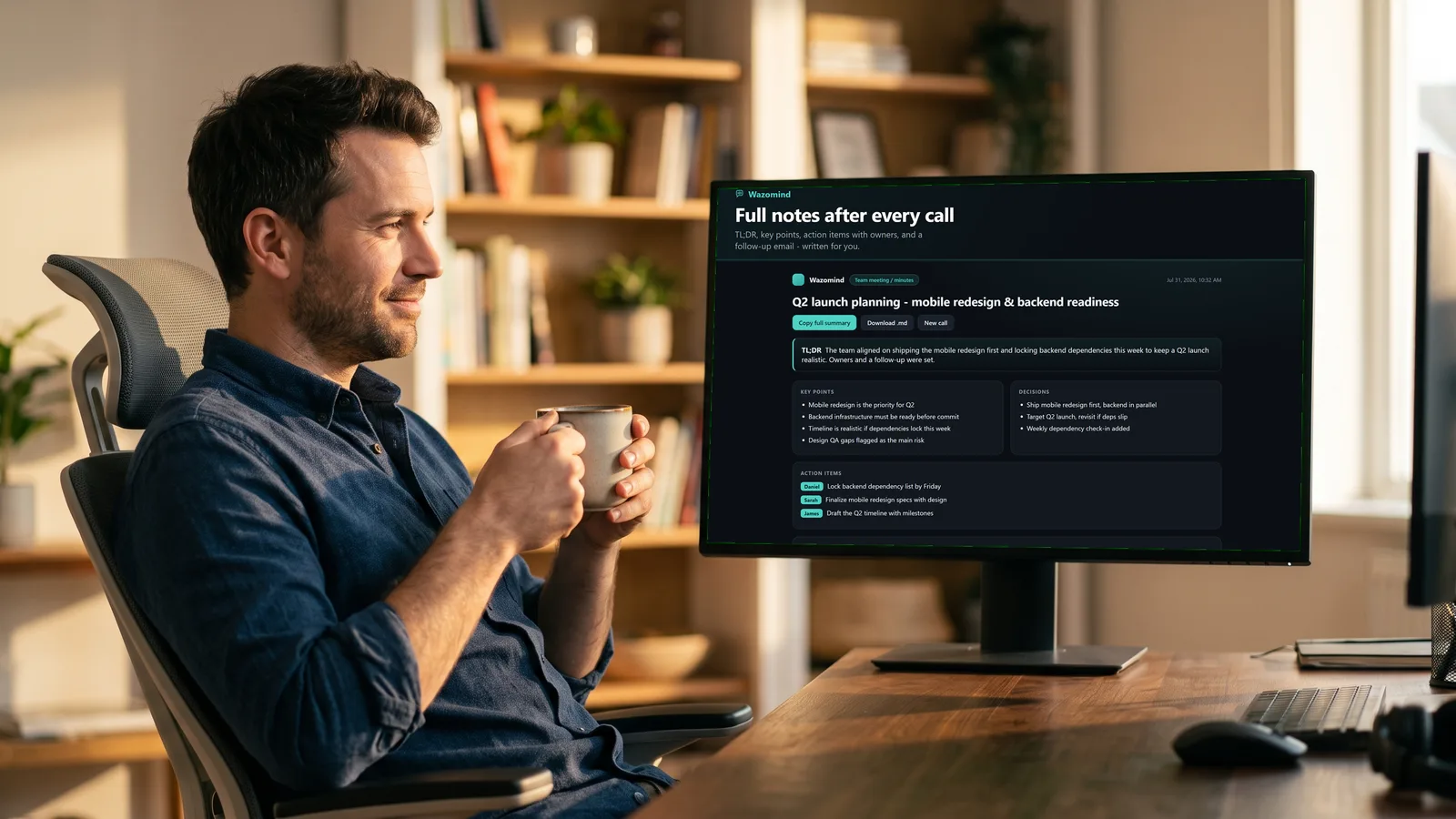
Chrome + WindowsA clean summary, the decisions, the action items and a drafted follow-up email - ready to send. The desktop app also drafts a calendar invite and a CRM note for you to confirm.
Chrome + WindowsClient lunches, site visits, board meetings. Put your phone or laptop on the table and Wazomind writes the transcript as people talk, then the notes, action items and follow-up email when you stop. In your browser, nothing to install.
After your first call, say yes to keeping your calls - that's it. From then on every call from the Chrome extension and the Windows app ends in your library at wazomind.com/app. Audio is never stored, only the notes and transcript.
Find the exact moment someone said "budget", "March" or a competitor's name - across every meeting you've ever had.
"What did Acme object to last month?" "What did I promise to send?" Press Ask Wazomind and get the answer in seconds, with links to the calls it came from.
Connect Google Calendar and press Prep me: a one-page brief from every past call with those people - open promises, objections, what to ask.
Send the notes with a link, put calls in team folders, and leave comments. Your team sees what happened without sitting in.
Owners and due dates pulled out automatically, a follow-up email drafted, and the notes emailed to you after every call.
Post notes to Slack or any tool via Zapier. Got an old recording? Upload it and get the transcript and notes.
Open my meeting library Free · sign in with Google
Windows app
Everything the Chrome extension does, plus what only a desktop app can.
When someone shares their screen, Wazomind reads the text on the slide or spreadsheet. So when they ask about a number on it, the answer it gives you uses their numbers, not a guess.
Them: So what would this cost us compared to now?
Answer · say this
You're at $48k a year for 120 seats and renew on 1 November, so we can plan the switch to start then, with no overlap.
from their shared screen
Share your screen or record the call and the answer overlay doesn't show up. Only you can see it. On by default.
Not just browser tabs. Works with the desktop clients most companies actually use.
Upload your pricing, battlecards or case studies. Answers come from your material. How it works
Picks up where you left off with a client, so you don't repeat questions or forget what was promised.
For sensitive calls, keep everything on your laptop with no internet connection needed. Private by design
The Chrome extension is the one-click way in. The Windows app is the full version - it hears the Zoom and Teams desktop clients, and it's where your documents, your past calls and offline mode live. Each card below says which one you get it in.
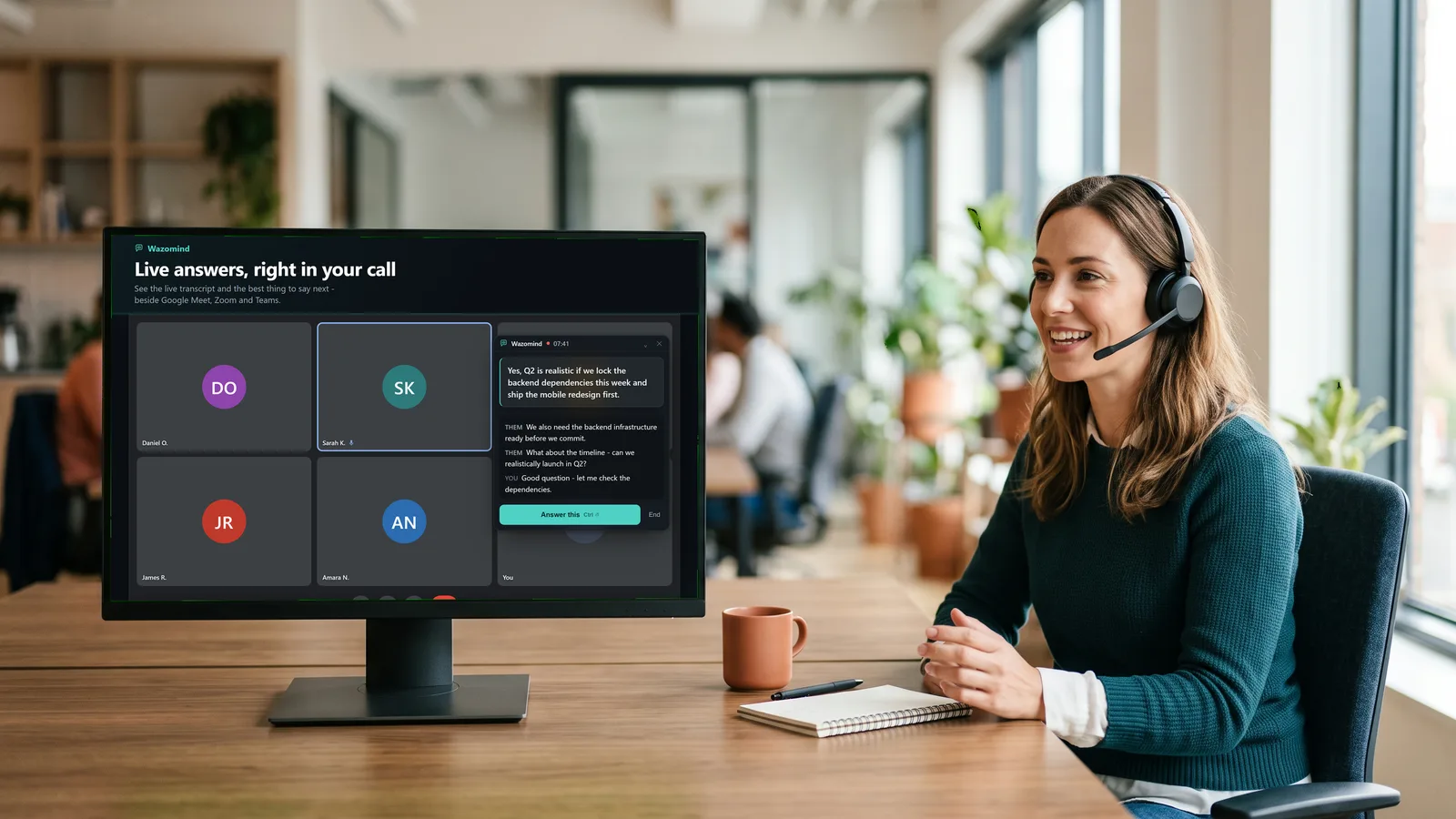
The moment a question lands, it drafts the reply - or hit one key to ask for anything. A sentence you can say out loud, not a wall of notes.
Add your pricing, battlecards and FAQs, and live answers use your real numbers instead of guessing. In Chrome: ⚙ → Your documents. The Windows app adds citations and PDFs.
Sharing a slide or a spreadsheet? It can read the numbers on it and answer questions about what's actually on screen.
"What did they say about pricing last time?" - search across your own past meetings, all stored locally.
Sales, board, client success, interviews. Each swaps the coaching, the summary and the scorecard. Free includes two.
Run on Wazomind's managed AI, bring your own key, or go fully offline with local models. Your call.
In the Windows app, your answer overlay stays out of screen shares and recordings: you see it, the people on your call don't, even while you're presenting. It's on from the moment you open the app. No bot joins your meeting, call audio is never stored, and in the Windows app your notes stay on your device.
No subscription, no monthly bill. Live transcription is always free - minutes buy the AI. Credits never expire, and bigger packs carry bonus credits. 1,000 credits = $1 base rate; a live minute is 40 credits.
5,000 credits: 3,990 + 1,010 bonus. One payment. Nothing renews.
One payment, no subscription.
Credits never expire.
Card, M-PESA or PayPal. No account needed.
The rate improves with pack size.
How it meters: 40 credits a live minute, with a 300-credit minimum per call. A call only costs credits once it actually gives you something - if the audio never worked, you keep them. Your last credits always buy one more call, so nothing is stranded.
$144 a year, or $19 month to month. Worth it past ~15 calls a month.
Or $19 month to month. Your first call is free, no card.
No PayPal account? Pay $144 for a year by card
Not on calls every day? Buy minutes instead, from $3.99
$288 a year, or $39 month to month.
Or $39 month to month
No PayPal account? Pay $288 for a year by card
Five Pro Plus seats, one invoice, and we set the whole team up.
No PayPal account? Pay $950 by card, no renewal
Need a different size? Talk to the founder
“I spent seven years running marketing teams in Nairobi, which meant a great many client calls where a director asked for a number and you were expected to have it. Every tool I tried summarised the call after it was over. So I built the one I actually needed - and I built all of it: the app, the transcription, the answers, this page.”
Founder · about Wazomind
A real-time AI meeting co-pilot. During the call it shows a live transcript and hands you the best thing to say next, or the answer to the question just asked. After the call it writes the summary, the decisions, the action items and a follow-up email. It comes as a Chrome extension and a Windows app.
No. Wazomind listens on your own device, so nothing appears in the participant list on Zoom, Meet or Teams - and it still works where notetaker bots are blocked. Recording is always indicated to you.
Those summarise after the meeting has ended. Wazomind helps during it - surfacing the answer, handling an objection, pulling a number from your docs - in about a second, and then still gives you the summary afterward.
No. Wazomind is a consent-forward assistant for meetings you're a part of - sales calls, client reviews, your own interview practice. Recording is always indicated to you, and in the Windows app stealth mode keeps your answers out of screen shares. Using it to misrepresent yourself in a live interview or exam is against its purpose.
No. The overlay lives only on your own screen, and the desktop app stays hidden even when you share your screen. Recording is always shown to you, and you're responsible for any consent your jurisdiction requires.
By default, nowhere. Transcripts and notes are stored locally. Audio is sent to your chosen AI provider only to be transcribed, using your own key or our managed service. Offline mode keeps everything on-device.
It's built local-first around a tight latency budget - transcript on screen in ~1.5s, a hotkey answer in ~1.5s. Fast enough to use mid-sentence, not the 5–10 second lag that makes live coaching useless.
Any of them - Zoom, Meet, Teams, Webex, or an in-person conversation. It listens to your mic and your system audio, so it's not tied to one platform.
Unlimited live transcription, free, in Chrome, Edge or the Windows app - not a 100-character, 5-prompt demo. The AI is what you pay for, and you pay in credits: $3.99 buys 5,000. A live minute is 40 credits, and 1,000 credits = $1 at the base rate. One payment, nothing renews, credits never expire. A call only costs credits once it actually gives you something, so a call that failed on audio costs nothing.
Free to start, nothing to set up, and it works on your very next meeting.
➕ Add to Chrome - free, no cardOn the Zoom or Teams desktop app instead? Get the Windows version.